Windows gamma adjustments

When porting Redshift to Windows I ran into trouble when setting a color temperature lower than about 4500K. The problem is that Windows sets limitations on what kinds of gamma adjustments can be made, probably as a means of protecting the user against evil programs that invert the colors, blank the display, or play some other annoying trick with the gamma ramps. This kind of limitation is perhaps understandable, but the problem is the complete lack of documentation of this feature (SetDeviceGammaRamp on MSDN). A program that tries to set a gamma ramp that is not allowed will simply fail with a generic error leaving the programmer wondering what went wrong.

There are workarounds, but you will not find them anywhere unless you have the patience to work your way through assembly listings of Windows DLLs. So here they are, for your convenience; these two tricks will work at least on a Windows 7 machine:

  • Go to the registry database and create the key “GdiIcmGammaRange” (that’s a capital I in Icm as in Image Color Management) under “HKEY_LOCAL_MACHINE\SOFTWARE\Microsoft\Windows NT\CurrentVersion\ICM”. The type must be DWORD. The value determines the amount of adjustment that can be made, where 0 means no adjustments possible at all, and 256 means any adjustment is allowed. You’ll find a REG-file below that sets it to 256.
  • Run your program from the Local System account.
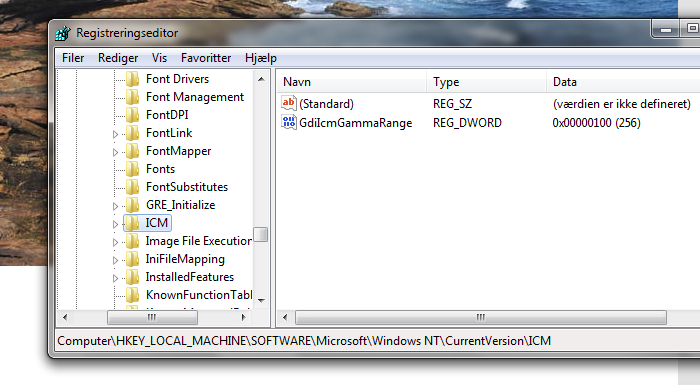
The registry key should be set as shown in this screen shot.

So if you want to run the experimental build of Redshift on Windows, you need to use one of the above methods if you want to use the same color temperatures as are available on the linux version.

Update: Here’s a REG-file that will set the appropriate key in the registry: RemoveGammaLimitation.reg. Save it with a “.reg” extension and double click to apply.

  • Lesath

    Did the registry thing and it didn’t work; have no idea how to use LocalSystem. Any suggestions?

  • aziz

    The registry thing didn’t work for me as well. I managed to open a high priviledge console with psexec though for testing and it does indeed work. I guess the only option then is to install redshift as a service and set it to run under the LocalSystem account.

  • http://jonls.dk/ Jon Lund Steffensen

    Perhaps it only works in certain versions of windows? Also, make sure that you spell the key correctly (it’s a captial I, not a small ell).

  • Lesath

    OH! I used a small L. I’ll try it again. Thanks.

  • Lesath

    Nothin’. And I’m on Windows 7. How does f.lux accomplish this?

  • http://jonls.dk/ Jon Lund Steffensen

    It doesn’t AFAIK. f.lux stays within the bounds of the windows limitations.

  • http://www.facebook.com/profile.php?id=572636184 Baran Karabulut

    I managed to make it work without the config file. And redshift uses wingdi method to work. But whenever i try to assign a different location for configuration file with -c command i ended up getting “failed to set wingdi option” Try -m METHOD:help for help message.

    So i try redshift.exe -m wingdi:help , this time the message is Adjust gamma ramps with the GDI. I gess that means by following your directions in regedit i couldnt make the changes successfully.

    Actually your directions for creating a new key is not clear. What do you mean the type must be dword. Because when i create GdiIcmGammaRange under ICM, the type of the new key is Reg_Sz and it is not possible to change it to another. The name of that key is (Default) btw i leave it like that. So after that i created a new dword key under new key and gave it 256 hexadecimal value. And the name of the dword is New Value #1 , it is named defaultly. Do i need to change the name of the key or the dword.

    Please give further detail.

  • http://jonls.dk/ Jon Lund Steffensen

    Hi Baran, please see the updated info above: screen shot and REG-file, that you may find useful. Let me know if it works for you. Also, please be aware that the Windows API sometimes returns errors even when the gamma adjustment is applied correctly. This may result in redshift being confused and failing even though things work fine. You may not be able to run redshift in continuous mode for this reason, but only in one shot mode with the “-o” command line switch.

  • http://www.facebook.com/profile.php?id=572636184 Baran Karabulut

    I have applied the REG-file and deleted the old registry changes i made. Apparently i created a wrong key and an extra dword under that key. But i really suggest you to change directions i think they are different from what you meant to say.

    When i remove the lines under from configuration file it worked like a charm.

    Adjustment-method=wingdi
    [wingdi]
    screen=1

    I have never experienced a problem about the continuous mode as you mentioned. Now it is working till i close the command line. Can i ask you one more thing ? Why don’t you make a gui out of these. I know there is a RedshiftGui out there but it is limited to 3400k. Running these codes everytime i start up the system may be frustrating.

    I wish there would be a shortcut to load it.

    PS: Did all with a system running Windows 7-64bit.

  • http://jonls.dk/ Jon Lund Steffensen

    Thanks for your suggestion. I agree that the directions can be hard to follow, problem is that I’m using what I believe to be the standard terminology. What you call a “dword” is actually called a key, but the “folders” are actually also called keys. Anyway, the REG-file is available now and that should be enough to specify exactly what’s needed to get this working.

    Feel free to write a GUI if you need one. I rarely use Windows these days, so I don’t really have a need for one.